The Ad limit serving nightmare.It starts with a sinking feeling. You check your AdSense dashboard and see those dreaded words: “Ad serving is limited” or “We’ve detected invalid traffic.”
Your earnings plummet to zero. Panic sets in. You search for answers but find only vague policy documents and forum posts from other desperate publishers.
I’ve been there. Three times, across different sites. The first time, it took me 45 days to recover. The last time? Just 14 days.
After going through this nightmare multiple times, I’ve developed a battle-tested process to not only fix ad serving limits but dramatically reduce the risk of them happening again.
This isn’t theoretical advice. This is the exact step-by-step protocol I used to restore $3,200 in monthly ad revenue. Let’s walk through it together.
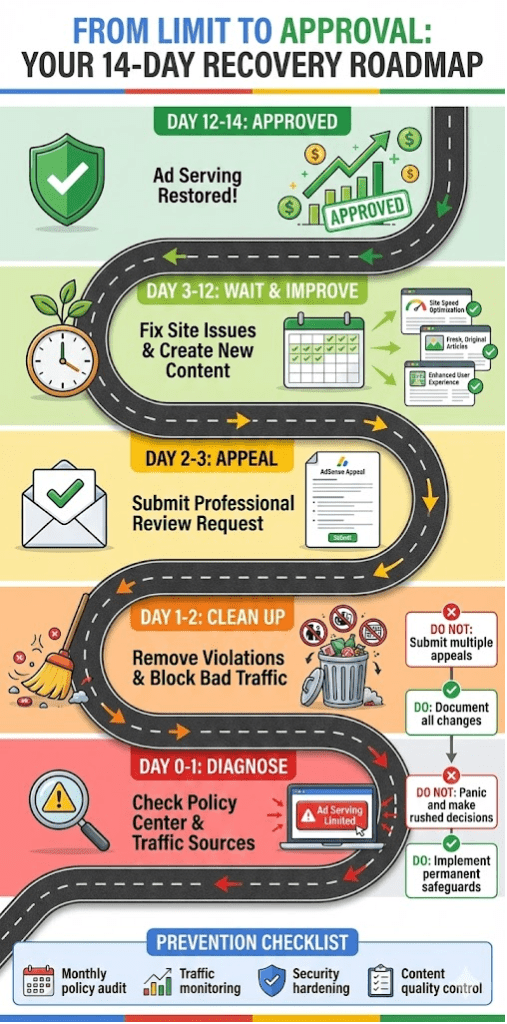
Ad Serving Limit?First: Don’t Panic. Understand WHAT Happened
When Google limits your ad serving, they’re essentially saying: “We’ve detected something suspicious, and we’re pausing your earnings until we can investigate.”
There are two main types of limits:
- Policy Violation Limits: You’ve violated a Google policy (e.g., copyrighted content, dangerous content, prohibited content).
- Invalid Traffic Limits: Google suspects artificial or fraudulent clicks on your ads (your own clicks, bot traffic, paid clicks, etc.).
The recovery process differs for each. Your first job is to diagnose which one you’re facing.
Step 1: The 1-Hour Diagnostic – Find the Root Cause
Action: Log into your AdSense account and go to Policy Center. This is your ground zero.
If You See a Specific Policy Violation:
Google will usually tell you exactly which policy you violated and on which pages. Common ones include:
- Copyrighted material (images, text, videos you don’t own)
- Dangerous or derogatory content
- Sexually explicit material
- Misrepresentation (your site doesn’t match what you told Google)
- Prohibited content (hacking, drugs, weapons)
My Experience: On one site, I had a “Misrepresentation” violation because my “About Us” page was generic and didn’t accurately reflect the site’s actual content.
If You See “Invalid Traffic” with No Specifics:
This is more common and often more frustrating. You need to play detective.
The Investigation Checklist:
- Check Your Traffic Sources: Did you recently buy traffic? Use a PPC campaign? Get a viral social media spike from a suspicious source?
- Analyze Your Audience Geography: Is there unusual traffic from countries you don’t normally get visitors from?
- Review Your Own Behavior: Did you or anyone in your household/office click your ads? Even accidentally?
- Check for Hacks: Has your site been compromised with hidden spam pages or malicious redirects?
My Experience: My second ad limit came from a sudden spike in bot traffic from Russia that I traced back to a shady “SEO service” I’d briefly tested.
Step 2: The 24-Hour Cleanup – Fix What’s Broken
Once you’ve identified the likely cause, take immediate and decisive action.
For Policy Violations:
- Remove or Fix the Violating Content: If it’s copyrighted images, delete them or replace them with licensed/original images. If it’s a policy violation in an article, either remove the article or heavily edit it to comply.
- Be Thorough: Don’t just fix one page if you have multiple violations. Go through your entire site.
- Document Everything: Take screenshots of the pages BEFORE you fix them and AFTER. This will be crucial for your appeal.
For Invalid Traffic:
- Block Suspicious Traffic Sources: Use Google Search Console to see if you have sudden spikes from unexpected countries. Consider using Cloudflare or similar services to block entire geographic regions if necessary.
- Install Security Plugins: If you suspect hacking, run security scans and implement strong security measures.
- Review Your Marketing Practices: Immediately stop any questionable traffic generation methods.
Step 3: The Critical Appeal – How to Write a Winning Request for Review
This is where most publishers fail. They write emotional, vague appeals that get rejected. Here’s the exact template I’ve used successfully multiple times.
Subject: Request for Review – Ad Serving Limit – [Your Site URL]
Body Template:
“Dear Google AdSense Team,
I am writing to request a review of my site [Your Site URL] which currently has ad serving limited due to [mention the specific policy violation OR ‘invalid traffic concerns’].
Upon receiving the notification, I immediately took the following corrective actions:
- [Action 1 – Be specific. Example: “I have removed all copyrighted images from my posts and replaced them with original screenshots I created.”]
- [Action 2 – Example: “I have reviewed my entire site and confirmed that all 147 articles now comply with AdSense program policies.”]
- [Action 3 – Example: “I have implemented geographic blocking for countries that were generating suspicious traffic patterns.”]
- [Action 4 – Example: “I have added a clear privacy policy and disclaimer page to improve transparency.”]
To prevent this issue from recurring, I have:
- [Prevention 1 – Example: “Implemented a content review process to ensure all new posts are policy-compliant before publishing.”]
- [Prevention 2 – Example: “Installed security monitoring to detect and block invalid traffic sources.”]
My site provides valuable, original content to [describe your audience], and I am committed to maintaining a high-quality, policy-compliant website.
Thank you for your time and consideration. I look forward to restoring ad serving to my site.
Sincerely,
[Your Name]
[Your Publisher ID]”
Why This Template Works:
- It’s professional, not emotional
- It shows immediate action
- It demonstrates understanding of the problem
- It shows commitment to future compliance
- It’s specific and evidence-based
Step 4: The Waiting Game – What to Do While Google Reviews
The review process typically takes 1-14 days. Don’t just sit there worrying.
Use This Time Wisely:
- Continue Creating Quality Content: Show Google you’re a serious publisher.
- Improve Your Site: Add those “About Us” and “Contact” pages if you don’t have them.
- Clean Up Technical Issues: Fix 404 errors, improve site speed, enhance mobile experience.
- Document Everything: Keep records of all your changes and improvements.
Step 5: Prevention – How to Make Sure This Never Happens Again
Once you’re reinstated (and you will be if you follow these steps), implement these safeguards:
- Regular Policy Audits: Once a month, review the AdSense program policies and check your site against them.
- Traffic Monitoring: Use Google Analytics to set up alerts for unusual traffic spikes.
- Content Quality Control: Never publish copied content. Always add significant original value.
- Security Hardening: Use security plugins, strong passwords, and regular backups.
- Transparency: Have clear privacy policy, disclaimer, and about us pages.
The Light at the End of the Tunnel
The ad serving limit feels like a death sentence, but it’s usually a temporary setback. Google isn’t trying to destroy your business—they’re trying to protect their advertisers.
By treating the limit as a wake-up call to improve your site rather than a permanent punishment, you can not only recover but come back stronger than ever.
My most successful site today was actually limited for policy violations two years ago. That painful experience forced me to create a better, more compliant, and ultimately more profitable website.
Your Action Plan:
- Diagnose the exact cause in Policy Center
- Take immediate, thorough corrective action
- Write a professional, evidence-based appeal
- Use the waiting period to improve your site
- Implement permanent safeguards
You can fix this. You will recover. Now take that first step.
Frequently Asked Questions (FAQ)
Q1: How long does the review process usually take?
A: Typically 3-14 days, but I’ve seen it take as little as 24 hours for clear-cut fixes. Be patient and don’t submit multiple appeals—it resets your place in the queue.
Q2: What if my appeal gets rejected?
A: Don’t give up. Re-read the policy center for any new details. Often, you missed something. Do a more thorough cleanup and wait 7-10 days before submitting a new, more detailed appeal.
Q3: Can I still earn money while limited?
A: No. Ad serving is completely paused, so you’ll earn $0 until the limit is removed. This is why quick, correct action is crucial.
Q4: Will this affect my search rankings?
A: Not directly. Ad serving limits and Google Search rankings are separate systems. However, if you had to remove large amounts of content to comply with policies, that could indirectly affect your traffic.